
AWS Deadline Cloud Persistent Storage: What It Actually Does (I Tested It Until I Was Sure)
A render farm spins up a fresh spot worker. Before it touches a single frame, it spends 85 seconds rebuilding the same environment it built an hour ago. Persistent storage is meant to end that. I ran it four times, plus one test designed to catch me fooling myself, to find out whether it really does, and where the marketing quietly oversells it.
The short version (for the people who don't have all day)
If you run spot fleets on Deadline Cloud with a heavy software environment, persistent storage is worth turning on. In my testing it cut a conda environment's cold start from ~85 seconds to ~2.1 seconds per worker, and I confirmed that saving survives the worker being thrown away and replaced, which is the entire point.
Three things the announcement won't tell you, and that I'll spend the rest of this explaining:
It's a cache, not a network drive. One volume, one worker at a time. It is not shared storage, and treating it like a NAS will burn you.
It's conditional. The first run pays full price to fill the cache, and idle volumes expire on a timer. Let them go cold and you're back to square one.
The asset-caching benefit depends entirely on which file mode you use. If you run the default (COPIED), you get the environment win and nothing for your scene assets. That distinction matters more than the feature page makes it sound.
If you're an exec: the cost math is trivially in your favour for steady workloads (EBS is cents per GB-month against compute that costs far more). If you're a TD: the rest of this is for you.
What the feature is, and what it does
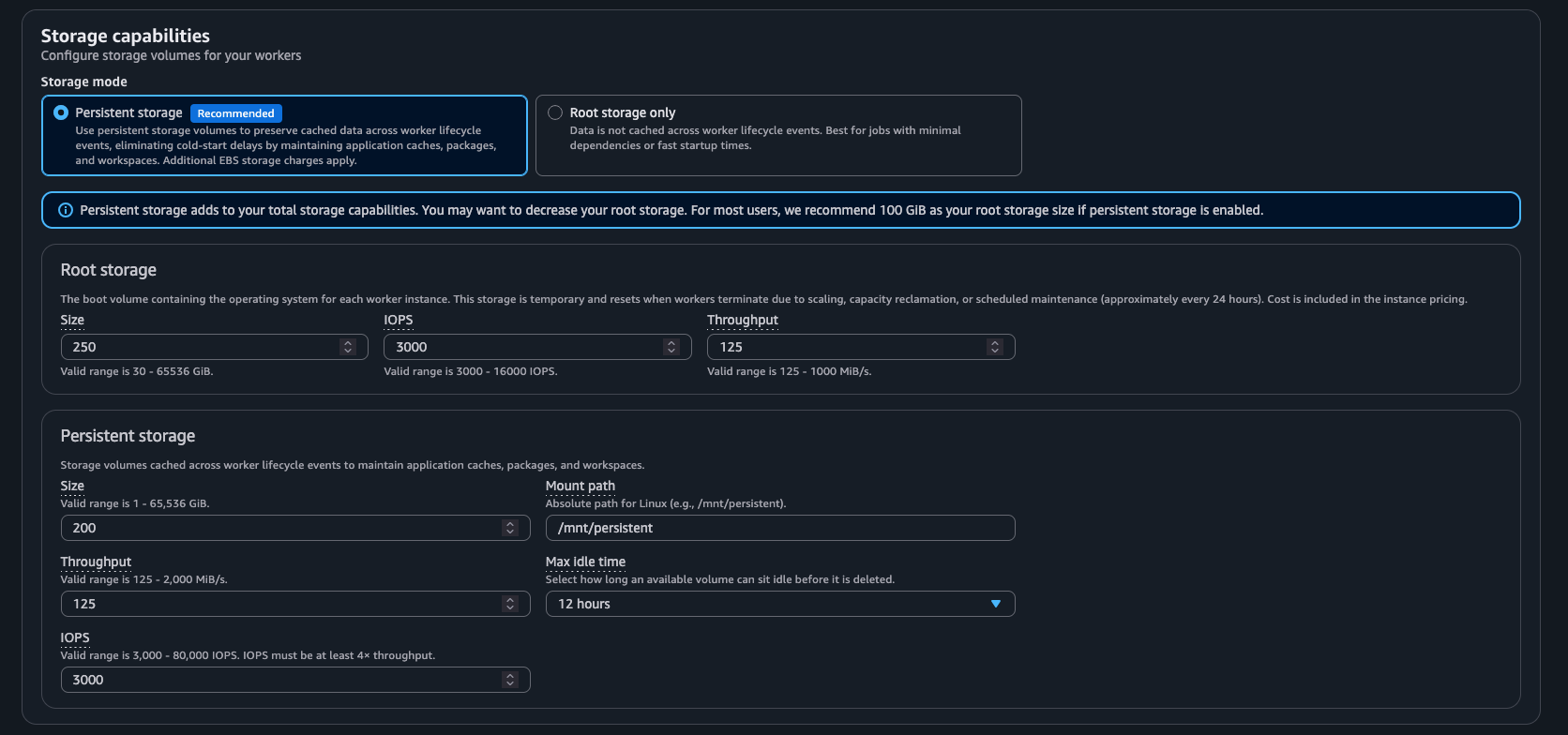
New — enable Persistent storage in the Deadline Cloud Fleet configuration
Persistent storage for service-managed fleets is a new capability from the Deadline Cloud team. It attaches a dedicated Amazon EBS volume to each worker in your fleet, with one job to do: stop spot workers from re-doing expensive setup work every time they launch.
Per the AWS documentation, the lifecycle is:
A worker launches. Deadline Cloud creates or reuses an available volume in the same Availability Zone and attaches it.
It formats the volume if it's new, and mounts it at a path you configure.
When that worker is replaced or scaled down, the volume detaches and waits, then reattaches to the next worker in the same fleet and AZ.
Whatever was written to that volume (your conda packages, the worker's home directory, the virtual file system's asset cache) is still there for the next worker. That's the whole feature: a scratch disk that outlives the machine it was bolted to.
You configure it like any EBS volume. In my tests I ran 200 GB at 12,000 IOPS and 250 MiB/s throughput, mounted at /mnt/persistent. The knobs are generous: size from 1 GiB up, throughput from 125 to 2,000 MiB/s, IOPS from 3,000 to 80,000 (and at least 4x your throughput), and a max-idle time that runs from an hour to months. So you can size the volume to your environment and tune it for how fast you need cold reads.
What everyone assumes it does
Three assumptions show up every time this comes up, and all three are wrong in ways that cost you.
"Finally, shared storage on service-managed fleets." This is the big one. People read "persistent storage" and picture a NAS: one pile of storage every worker mounts at once, like an on-prem fileserver. It is not that. Each volume serves exactly one worker at a time. It's reused across the worker lifecycle, never mounted to two workers simultaneously.
"Turn it on and everything gets faster." People assume it's automatic and universal: flip the switch, every job speeds up. It isn't. The first run on a fresh volume is just as slow as no persistent storage, because it's the run that fills the cache. And the speedup only lands while the cache is still warm.
"It'll cache my scene assets." People expect their 20 GB of textures and geometry to cache on the volume and load instantly next time. Whether that happens depends on a setting most people never think about, and for the most common rendering setup, it doesn't happen at all.
How it actually works
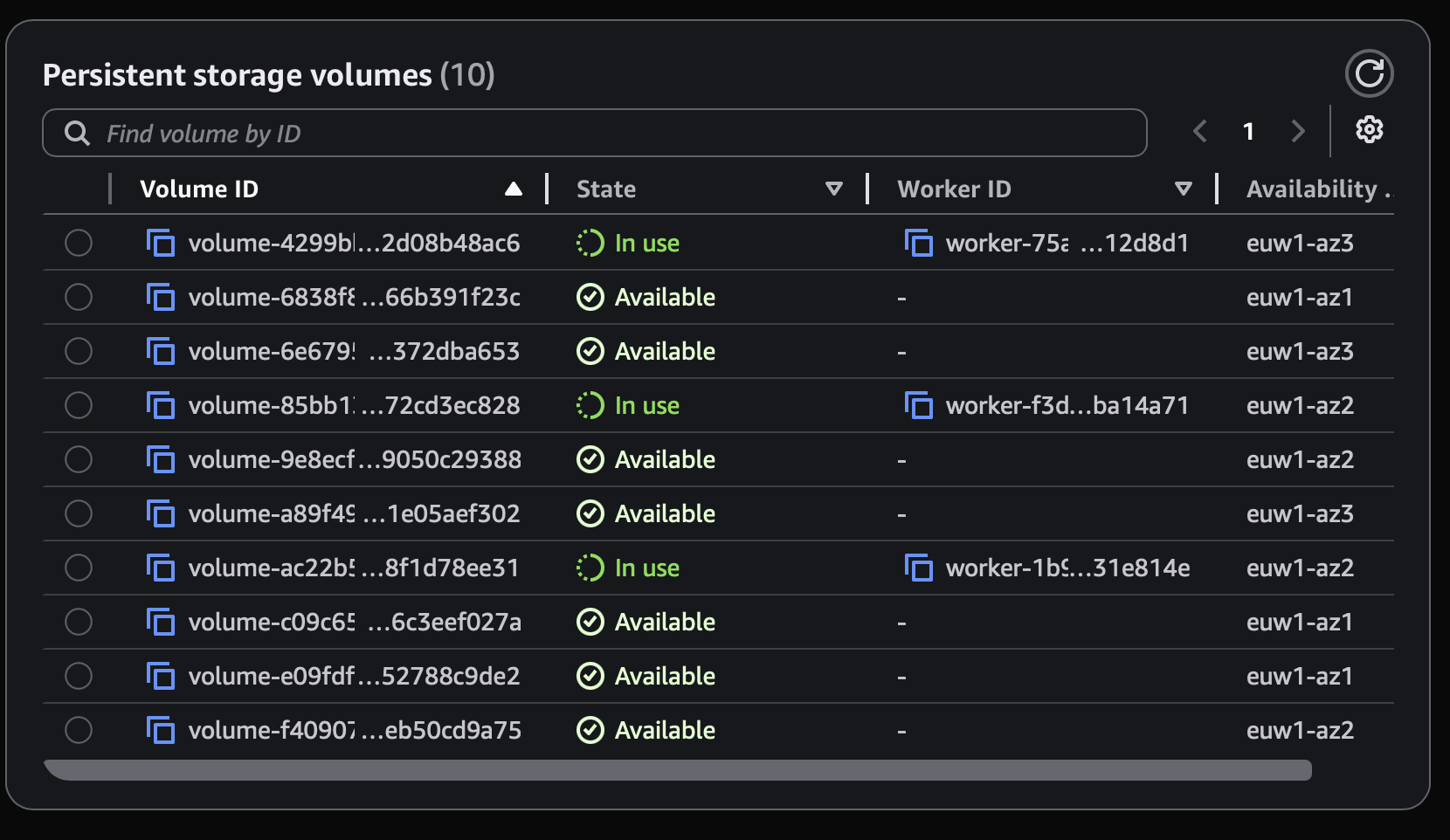
Deadline Cloud Monitor shows each fleets' persistent storage volumes and its states
Three mechanics decide whether you see a benefit.
It caches the home directory. Deadline Cloud points the worker's home directory at the persistent volume. Anything that lands there (conda environments, application caches) persists. This is where the big, reliable win comes from: a heavy software environment installs once and is reused. If your software writes important data outside the home directory, you have to reconfigure it to use the mount path, or it won't survive.
The asset cache depends on your file mode, and this is the part that trips people up. Deadline Cloud has two ways to get job input files onto a worker:
COPIED (the default): downloads all input files to local disk before tasks begin. It's the right choice when every task needs most of the scene, which is exactly what frame rendering looks like. The catch: COPIED does not use the persistent VFS cache. So if you're on the default, persistent storage does nothing for your assets. You get the environment win only.
VIRTUAL (the virtual file system): mounts the inputs and streams files on-demand as your software reads them, instead of downloading everything up front. With persistent storage enabled, the VFS immutable object cache lives on the volume, so assets a previous worker already pulled are served from the volume instead of re-downloaded from S3. VIRTUAL is Linux-only on service-managed fleets, and it shines when each task touches a subset of a large dataset with a big fleet, not when every frame needs the whole scene.
So the honest shape of the asset benefit: it's real, but only in VIRTUAL mode, and it shows up as faster on-demand reads during the render, not as a faster file-sync step. For a studio rendering whole scenes per frame (where COPIED is the recommended mode), the asset cache is mostly beside the point. The environment cache is the prize.
It's scoped, and it's temporary. Volumes are tied to a specific fleet and Availability Zone: a volume in one AZ can't serve a worker in another. And idle volumes bill until a max-idle-time TTL expires, at which point they're released. That TTL is both your cost guardrail and the clock on your cache. Let it run out between jobs and your next worker starts cold.
What I measured, and the test that mattered
I ran this on a real Maya 2026 + V-Ray setup (a 2.45 GB conda environment) on a spot service-managed fleet. Here's the path, including the rounds that went nowhere, because the dead ends are where the truth was.
Round 1, a 4K still. Persistent storage loaded the environment in ~5 seconds against ~89 seconds cold. Encouraging. But the frames ran ~50 minutes each so the saving was a rounding error on the job, and the two runs landed on different instance types. Too confounded to claim anything.
Round 2, a 100-frame animation. I expected the saving to stack up. Instead the cache hit rate was ~0% and the job was no faster. The volumes had gone cold between runs, so there was nothing to reattach. This is the result that taught me the feature is conditional, not automatic.
Round 3, switching to VIRTUAL to chase the asset cache. Asset sync went from ~3 seconds to ~1 second. Nothing. That's when the mechanism clicked: in VIRTUAL mode the sync step just mounts, and assets stream on-demand during the render, so there's no fat download step to cache away. The conda number held again, though: ~85s cold, ~2s warm.
Round 4, bigger assets, a tuned volume, and an uncomfortable question. Conda warm came in at ~2 seconds again. But the warm runs had reused the same workers that were still alive from the previous run. A live worker already has its environment, and so would a root block device. So was I measuring persistent storage, or just workers that hadn't been recycled yet? I couldn't tell. Four rounds in, the headline was still confounded.
The isolation test. There's only one way to separate the two: make the workers go away. I ran the cold job to fill the volume, let the workers terminate, then ran again onto brand-new workers that had never seen the first job. If the environment still came up fast, it could only be the volume reattaching.
The fresh worker brought the environment up in 2.1 seconds.
That's the proof. A worker that never ran the cold install, picking up a volume left behind by a worker that no longer exists, skipped the entire ~85-second rebuild. It's the feature doing the work, not a lucky warm machine.
What I deliberately do not claim, because the data didn't support it: no asset-caching speedup I could measure (the benefit hides in on-demand render reads, not sync time), and no wall-clock claim (job duration never cleanly favoured persistent storage and was confounded by overlapping runs and instance differences every round). The honest unit is the per-worker cold start. That's the number I'll stand behind.
So which are you, and is it worth it?
If you run COPIED (most studios rendering whole scenes per frame): persistent storage gives you the environment cache and nothing for assets. For a heavy conda or software environment, that alone is worth it. You're erasing ~80-plus seconds of cold start on every fresh worker.
If you run VIRTUAL (subset access across a large fleet, think large asset libraries where each task touches a slice): you get the environment cache and a persisted asset cache that saves repeated S3 pulls. Test it first; VFS isn't optimized for every workload and AWS says so plainly.
The cost side is the easy part. Persistent EBS runs roughly $0.10/GB-month. A 2.45 GB environment is loose change against the compute you'd otherwise burn rebuilding it on every worker launch. The real lever isn't cost, it's cadence: the benefit lands when workers cycle through within the TTL window, and evaporates when the fleet goes fully cold between bursts. Persistent storage pays best for steady, ongoing throughput. For occasional one-off jobs with long gaps, you'll mostly pay the cold start anyway.
And keep the caveats in view. There's no fallback: if the volume can't be provisioned (a quota limit, say), the job fails rather than running without it. It's one volume per worker, not shared storage. And idle volumes bill until the TTL releases them. Set that TTL like you mean it.
Where this goes next
Persistent storage gets more interesting when you pair it with another recent addition: task chunking, which groups several frames into a single task run so the application and scene load once per chunk instead of once per frame. Stack that on a warm environment cache and you're cutting overhead from two directions at once.
It also raises questions I'm still testing, and they're worth a post of their own. When a five-frame chunk is interrupted after three frames, can the work resume at frame four rather than restarting all five? And what happens to the frames already rendered? Today, job outputs sync back only after a task completes, so an interruption can throw away finished work. Persistent storage hints at a better story here: if those outputs live on a volume that survives the worker, they don't have to be lost. I haven't proven that yet. That's the next experiment, and the next write-up.
The takeaway
Persistent storage does what it claims: it kills the environment cold start, ~85 seconds down to ~2. But it's conditional, it's per-worker rather than shared, and its asset-caching benefit lives or dies on a file-mode setting most people never examine. None of that is in the announcement. It took four rounds and one isolation test to separate what's real from what I wanted to be true.
That's the part I care about most, and it's worth saying plainly: my job isn't to tell you a feature is great. It's to tell you exactly what it does, what it doesn't, and where the line sits, so you can make the call for your pipeline. If you're sizing this up, or you just want to compare notes on Deadline Cloud and spot fleets, send me a message. And if you've measured this differently, I want to hear it.
Sources: AWS Deadline Cloud persistent storage announcement · Persistent storage for service-managed fleets · Deadline Cloud virtual file system · Task chunking · Deadline Cloud pricing. Cost figures are illustrative and vary by region and configuration.
